~/runtimelab $ cat ./content/blog/what-happens-when-you-press-run.md
What happens when you press Run
Your code goes into a repo we host, a worker on a separate machine checks it out and runs the tester in a container with no network, and a pass leaves a record you can point at. The path from button to green, and the four limits along it.
Runtime Lab used to run tests on your machine, in Docker, with a runner you installed. We reversed that. Docker was a wall for anyone on a Chromebook, a locked-down work laptop or a phone, and a platform that says "build the real thing" should not begin with an installation. So the tests run on hardware we own, and the button in the editor is the whole interface.
Here is the path from that button to a result.
Your code is a repo we host
Enrolling in a challenge creates a private git repository for it, with the starter template already committed. The editor in the workbench edits that repo directly: saving is a commit. Clone it, push to it, and it is the same repo, which is why the challenge page can say that a test run executes exactly what you see on screen.
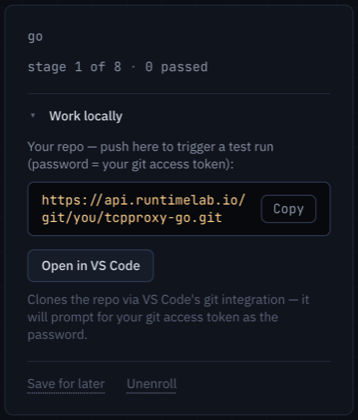 The clone URL lives under Work locally; the password is your git access token.
A worker on another machine
The API server that serves the site never runs your code. Neither does the database, and neither does the machine that hosts the repos. A run is a job in a queue, and a worker on a separate box takes it: it clones the commit, builds it, and runs the challenge's tester against it inside a container.
That container has:
- no network —
--network none, so a build cannot fetch anything and a tester cannot talk to anything but your program on loopback; - a read-only filesystem apart from a scratch directory;
- no capabilities, running as an ordinary user, with the challenge's memory and CPU budget.
The worker holds no database, no repos beyond the one it just cloned, and no credential of yours. If a run could escape its container, it would find a disposable machine with nothing on it.
A challenge is only allowed onto this path after its reference solution has been run through every stage under exactly those flags. "Hosted eligible" is earned by that check, not decided.
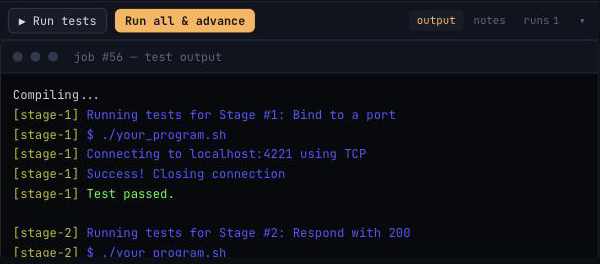 The log, stage by stage. This one passed stages 1 and 2 and failed on 3.
While a run waits behind others, the dock says where it is in the line, so a wait with a reason does not read as a hang.
Four limits
Every run costs us a little money, and a runaway loop costs the person next in the queue their turn. So runs are rationed, and it is worth knowing how.
| who | limit |
|---|---|
| free account | 20 runs, ever — enough to feel the pass/fail loop |
| pass holder | 200 a day |
| everyone, pass included | 30 an hour, and 2 at once |
The last two exist to protect the machine rather than the bill. Thirty an hour is set from what a person can actually use: iterating on a stage is edit, run, read the log, think, and a run every two minutes is already faster than most of that loop. The note beside the run buttons says how many you have left.
What a pass leaves behind
When a stage passes, the worker uploads that stage's source as a snapshot, kept with your account. Only you can see it; it is never re-run. The runs tab keeps every log, so you can open the one that failed yesterday next to the one that passed today.
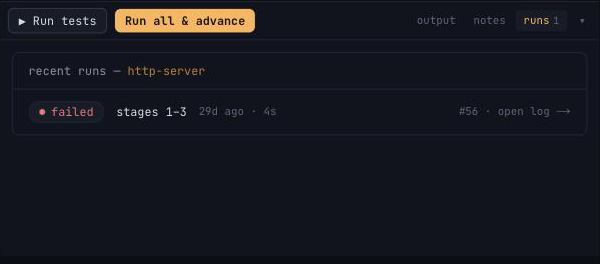 Each row opens its log.
Pass the last stage and the challenge produces a public record: which challenge, in which language, which stages, against which pinned version of the tester, on which date. Your profile collects them, and each has its own link. What a finished challenge leaves behind is about what that record is good for.
When a stage is wrong
Sometimes the tester is the bug. The Report button in the workbench bar sends us the stage with the run you are looking at attached, so a report about a failing test arrives with its log rather than a description of it. Those go to the top of the pile.